VELUX Support - VELUX Touch
Copy the products from an existing wall-switch (KLI 31-) to VELUX Touch
This article shows you how to add the products controlled by an existing wall switch (KLI 311, KLI 312 or KLI 313) in order to finalise the setup of your new VELUX Touch.
Prepare your product(s) to be added to your new VELUX Touch.
IMPORTANT: In case you use both one-way and two-way controls in your home, always start copying the products from a two-way control.
- Tap the front button (up and down icons) to verify that the wall switch controls the product(s) to be added.
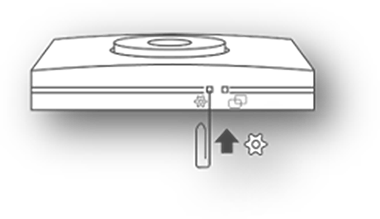
- Locate the settings button (gear icon) on the side of the wall switch.
- Press the settings button briefly with a pointed object bringing the product(s) into pairing mode, causing window/roller shutter/blind to move slightly for confirmation.
Now return to your VELUX Touch to complete the product transfer and installation.
Note: The product transfer has to be completed within a maximum of 10 minutes.
How can we help you?
Need further assistance?
If you are not sure how to proceed or you can’t find what you are looking for, get the help you need.